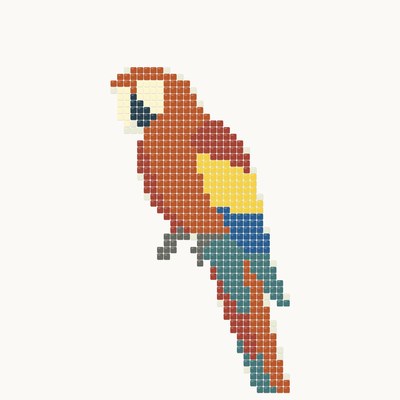

You can get a mosaic cartoon without a photo: describe the subject in words, pick a style, a palette, the panel size and the module, and the ANDAMENTO AI generator draws a mosaic sketch. The styles are the same as for mosaics from photos: classic Roman laying, modern mosaic of free-cut smalti and glass, Soviet monumental smalti, trencadís of broken ceramics in the manner of Gaudí, Opus — Roman laying in marble — and Incertum of irregular stone with no rows. The Natural stone palette turns any style into a mosaic of stone in muted tones; Opus and Incertum use it by default.
Frequently asked questions
How do I write a description for a mosaic?
Describe what is shown: the main subject, the background, the mood and the main colours — for example, “a peacock among leaves, gold background, blue and emerald tones”. There is no need to describe the technique or material: the chosen style sets them.
How do the styles differ?
Classic is Roman laying: rows of tesserae follow the outlines of the subject and the background is laid in calm rows; with the Natural stone palette it becomes an ancient mosaic of stone. Modern is free-cut smalti and glass in pieces of different shapes. Soviet is the monumental smalti of 1960s–80s murals. Trencadís is shards of glazed ceramics, as in Gaudí's Barcelona. Opus · stone is Roman laying in marble of muted tones. Incertum is irregular pieces of natural stone with a narrow dark joint and no rows.
What is the module?
The piece size relative to the panel: small (≈ 10 mm) gives more detail, medium (≈ 15 mm) is the default, large (≈ 20 mm) gives a bold decorative laying. Small and large are Pro.
What do I do with a sketch generated from a description?
The sketch sets the composition, colours and laying pattern — a mosaicist lays the mosaic from it, matching smalti to the colours. The calculator estimates materials for a panel of the size you need.
Materials calculator
How it works
The photo is sent to the server only on “Try the sketch on” or “Visualize”.